
TL;DR:
- Remote HVAC monitoring captures equipment data continuously to detect faults early and reduce emergency repairs. It can lower emergency calls by up to 60 percent and save energy costs within about a year and a half. Implementing it involves integrating sensors, cloud platforms, and analytics with existing systems for proactive maintenance.
Remote HVAC monitoring continuously collects equipment data — temperature, pressure, electrical current, runtime, and alarms — and alerts your team to developing faults before those faults become failures. That single capability changes how maintenance works: instead of reacting to a breakdown at 2 AM, you schedule a repair during business hours with the right parts already on the truck.
The practical payoff is immediate. Facilities using remote monitoring report 40–60% fewer emergency calls, and continuous fault correction can save $0.10–$0.40 per square foot per year in energy costs. Three benefits show up first:
- Early fault detection that reduces emergency calls and after-hours failures
- Energy and operating-cost reduction through schedule and setpoint optimization
- Faster, better-informed service visits because technicians arrive knowing what is wrong
When monitoring feeds analytics that generate prioritized work orders, it converts unpredictable repairs into scheduled, data-driven maintenance. That is the core role of remote HVAC monitoring, and the rest of this article explains how to put it to work.
Table of Contents
- How does remote HVAC monitoring work?
- What are the primary benefits of HVAC monitoring?
- Is periodic on-site maintenance enough?
- What does adoption cost, and how do you estimate ROI?
- How do you implement monitoring with your current provider?
- What data security checks should U.S. facilities require?
- How does remote monitoring scale across multiple sites?
- How does monitoring support compliance and tenant satisfaction?
- How does monitoring change the maintenance workflow?
- When should you adopt monitoring, and what does a pilot look like?
- Real-world examples of remote monitoring impact
- Key Takeaways
- Why remote monitoring deserves more credit than it gets
- Strongheatingandcooling can help you get started
- FAQ
How does remote HVAC monitoring work?
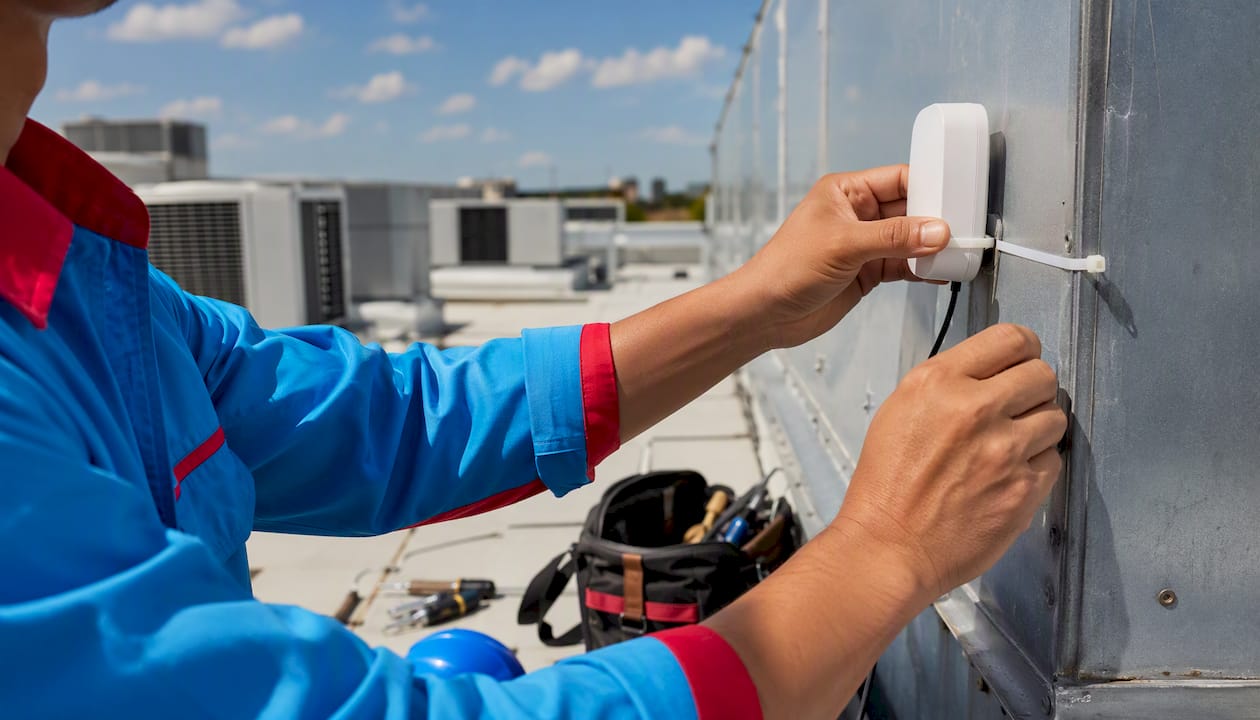
Sensors installed on your equipment measure the signals that matter most: supply air temperature at the discharge, current draw on the compressor, vibration on fan motors, and pressure on chilled water or refrigerant lines. A gateway device collects those readings and sends them to a cloud platform over Ethernet, Wi-Fi, or cellular. The cloud platform runs analytics, flags anomalies, and pushes alerts to a dashboard or mobile app. Modern platforms connect to existing building automation systems (BAS) using BACnet/IP, Modbus, and API protocols, so most BAS installed after 2000 can integrate without full replacement.
| Component | Typical cost range | Refresh rate |
|---|---|---|
| IoT sensors (per point) | $50–$500 | 30 sec–5 min |
| Wireless retrofit kit (per unit) | $200–$800 | 30 sec–5 min |
| Gateway device | $200–$2,000 | Continuous |
| Cloud platform subscription | $0.02–$0.10/sq ft/yr | Real-time |
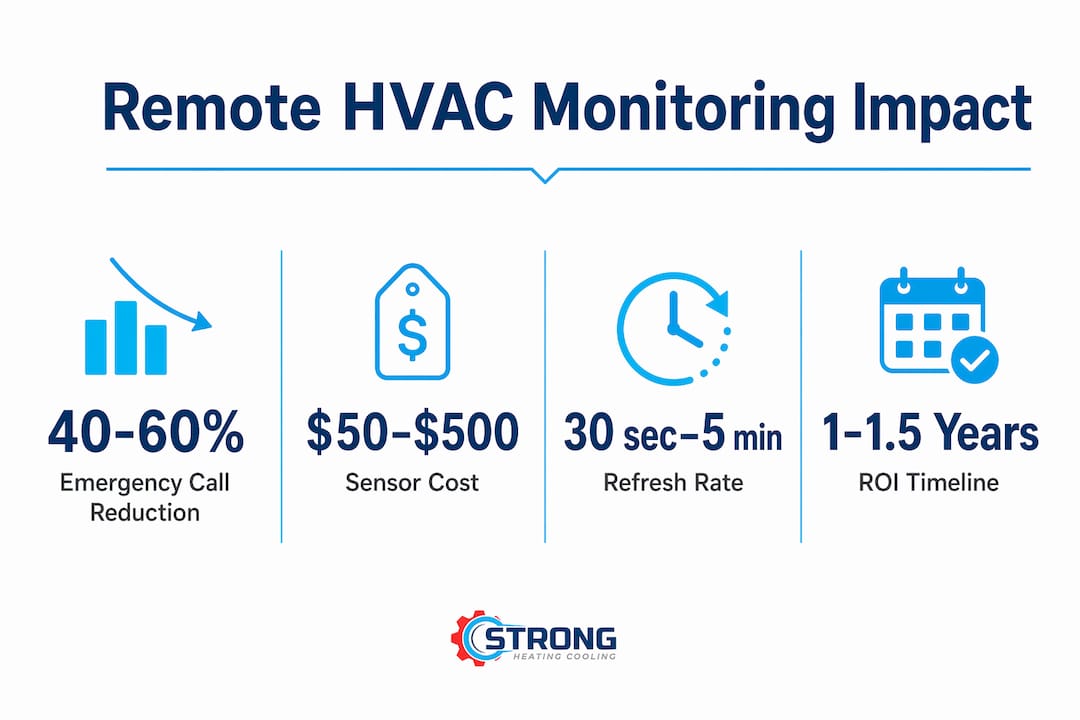
Refresh rates of 30 seconds to 5 minutes are standard. “Real-time” in a facility context means your team sees an alert within minutes of an anomaly, not hours or days.
Pro Tip: Before installation, map every piece of equipment to its location and note existing wiring runs. Connectivity gaps discovered after hardware is ordered add cost and delay.
What are the primary benefits of HVAC monitoring?
Early detection is where the value concentrates. When a sensor catches a compressor drawing 15% more current than its baseline, you schedule a bearing inspection. Without monitoring, that same compressor runs to failure, and the repair bill includes emergency labor, refrigerant recovery, and a truck roll that costs $150–$400 per dispatch.
Key benefits with supporting evidence:
- Fewer emergency repairs: 40–60% fewer emergency calls in retail, restaurant, and banking portfolios; chiller and cooling tower startup failures reduced by 90% in year-round readiness programs
- Energy savings: Schedule optimization, setpoint resets, and fault correction together deliver notable energy savings; the U.S. Department of Energy reports significant annual HVAC energy savings in commercial buildings using advanced controls
- Longer equipment life: Stable operating conditions reduce mechanical stress on compressors, fans, and motors, extending mean time between failures
- Better occupant comfort: Tighter temperature and humidity control means fewer complaints and faster resolution when conditions drift
- Compliance support: Automated event logs and exportable data support warranty claims, insurance documentation, and ASHRAE-adjacent reporting
A simple ROI scenario: a small commercial portfolio spending several hundred dollars per month on monitoring avoids multiple emergency truck rolls monthly, resulting in net savings with additional energy savings. Many facilities see payback within about a year to a year and a half.
Is periodic on-site maintenance enough?
Scheduled preventive maintenance (PM) visits are necessary but incomplete on their own. Equipment performance can drift significantly between quarterly visits, and after-hours failures go unnoticed until they become emergencies. Remote monitoring does not replace on-site PM; it shifts many tasks from time-based to condition-based, so technicians intervene when data shows degradation rather than when the calendar says so.
| Approach | Best for | Response time | Cost profile | What it misses |
|---|---|---|---|---|
| Calendar-based PM only | Single-family homes, simple split systems | Hours to days | Predictable, lower upfront | Faults between visits |
| Remote monitoring only | Multi-site retail, data centers, hospitals | Minutes | Upfront hardware + subscription | Physical inspections, refrigerant checks |
| Combined approach | Most commercial and multi-family properties | Minutes (alerts) + scheduled visits | Moderate, best ROI | Very little |
For a single-family home, a preventive maintenance schedule paired with a smart thermostat may be sufficient. For a property manager running 20 rooftop units across three locations, remote monitoring is the only practical way to maintain visibility.

Pro Tip: Run a 4–8 week shadow period after installation where alerts are logged but no action is taken. Use that data to tune thresholds and separate real faults from normal operating variation before switching to condition-based PM on critical assets.
What does adoption cost, and how do you estimate ROI?
The total cost of remote monitoring has three layers: upfront hardware, installation labor, and an ongoing subscription. Hardware and installation are one-time; the subscription is what keeps the analytics and alerting running.
| Cost item | Typical range |
|---|---|
| Sensor (per point) | $50–$500 |
| Wireless retrofit kit (per unit) | $200–$800 |
| Gateway | $200–$2,000 |
| Cloud subscription | $10–$50/asset/month or $0.02–$0.10/sq ft/yr |
A conservative ROI estimate for a 10-unit portfolio: total hardware and install at $6,000, subscription at $300/month. If monitoring eliminates two $250 truck rolls per month and saves $150/month in energy, the monthly net benefit is $200 after subscription costs. Payback lands around 30 months on hardware alone, faster when energy savings are larger.
Practical budgeting guidance:
- Pilot 5 critical units first to validate alert accuracy before committing to full coverage
- Scope wiring and connectivity costs separately; cellular gateways add $30–$60/month per site but eliminate Wi-Fi dependency
- Ask vendors for per-unit pricing breakpoints; most platforms discount at 10+ assets
How do you implement monitoring with your current provider?
Most modern BAS platforms and HVAC service providers can integrate remote monitoring. Implementation typically follows a phased pilot rather than a full rollout on day one.
Pre-install checklist:
- Audit your equipment inventory (make, model, age, location)
- Assess connectivity at each site (Wi-Fi, Ethernet, cellular coverage)
- Identify the 5–10 highest-risk or highest-cost assets for the pilot
- Order hardware and confirm sensor compatibility with existing equipment
- Schedule installation visits and coordinate with building access
Questions to ask your provider:
- How does the platform integrate with our existing BAS or controls?
- Who owns the data, and can we export it at any time?
- What is the alert escalation chain for a critical fault at 3 AM?
- What truck-roll reduction have similar customers achieved?
- What is the SLA for critical alert response?
After installation, run a 30–90 day shadow period. During that window, onboarding typically surfaces 5–15 existing issues before any machine learning model is trained, so early wins often justify the platform cost before the analytics even mature.
What data security checks should U.S. facilities require?
Security is a reasonable concern when building systems connect to the internet. The good news is that reputable platforms address the main risks by design. Ask for written confirmation of the following before signing a contract:
- Transport encryption (TLS 1.2 or higher) for all data in transit
- SOC 2 Type II or ISO 27001 certification from the vendor
- Role-based access controls so technicians see only their assigned assets
- API audit logs that record every data access and configuration change
- Clear data retention and deletion policies
- Breach notification window of 72 hours or less
- Data export rights so you can leave the platform without losing history
- Mandatory two-factor authentication for all staff accounts
For multi-tenant properties, confirm that the dashboard and alerting system does not expose one tenant’s occupancy patterns or temperature preferences to another. Tenant data, even operational data, can qualify as personally identifiable information under some state privacy frameworks, so a brief review with your legal counsel is worth the time.
How does remote monitoring scale across multiple sites?
A single cloud dashboard with standardized alerts is what makes multi-site management practical. Without it, a property manager running 15 locations is checking 15 separate systems, each with its own interface and alert logic.
Features to require for multi-site deployments:
- Cross-site asset registry with unified search and filtering
- Global setpoint and schedule changes pushed to multiple units simultaneously; facility managers report this as a major value-add for reducing human error and energy waste
- Templated alert escalation chains that apply consistently across sites
- Mobile push notifications with one-tap acknowledgment
- Technician mobile logs that capture arrival time, actions taken, and parts used
Use cases vary by property type. A retail chain uses remote monitoring primarily to catch refrigeration and comfort failures before customers notice. A hospital or data center runs it as a continuous uptime tool where any temperature excursion triggers an immediate escalation. A multi-family property manager uses it to document response times and protect against tenant complaints. Smart thermostat integration extends these capabilities further by enabling automated setback schedules across all units from one interface.
How does monitoring support compliance and tenant satisfaction?
Remote monitoring simplifies documentation for maintenance records, warranty claims, and code-adjacent reporting. It does not replace regulatory filings, but it provides the data those filings require.
Reporting features worth using:
- Automated daily, weekly, and monthly performance summaries
- Timestamped event logs for warranty and insurance documentation
- Exportable CSV files for audits and internal compliance reviews
- ASHRAE-aligned runtime and efficiency tracking
Tenant-facing benefits are equally concrete. When a tenant reports a comfort issue, a monitoring platform shows exactly when the temperature drifted, what caused it, and when it was corrected. That transparency shortens disputes and builds trust. A simple notification workflow, where tenants receive an automated message when a fault is detected and a follow-up when it is resolved, reduces complaint volume noticeably in multi-family and commercial settings. Confirm local building code and insurance requirements with your provider, since documentation standards vary by jurisdiction.
How does monitoring change the maintenance workflow?
Remote monitoring is most powerful when it feeds analytics that create prioritized, pre-populated work orders. The workflow has six steps:
- Baseline collection: The platform learns each asset’s normal operating signature over 7–14 days.
- Anomaly detection: Rule-based and machine-learning models flag deviations from baseline.
- Fault classification: The system isolates the likely fault (bearing wear, refrigerant loss, electrical issue) and assigns a severity score.
- Work-order creation: A prioritized work order is auto-generated with asset ID, predicted failure mode, recommended action, and parts list.
- Technician dispatch: The technician arrives with the right parts and a pre-diagnosis, cutting repair time.
- Feedback loop: Post-repair sensor data confirms the fault cleared and sharpens the model for future predictions.
Analytics can detect degradation several weeks before failure in some deployments, and AI predictive models achieve substantial reductions in unplanned failures with sufficient baseline data. A hybrid framework combining rule-based fault detection with machine learning, similar to the APAR-based approach validated in recent building research, improves detection accuracy while keeping the logic interpretable for facility staff.
Pairing monitoring with analytics that auto-generate prioritized work orders elevates maintenance from unpredictable firefighting to scheduled, efficient work — and that shift is where the real cost savings accumulate.
Pro Tip: During the pilot, have a technician manually verify the first 10–15 predicted failure modes. That validation step trains the model faster and reduces false positives within the first 90 days.
When should you adopt monitoring, and what does a pilot look like?
Adopt remote monitoring when you manage multiple assets, experience recurring emergency calls, or want to shift from calendar-based to condition-based maintenance. A single-family homeowner with one system and a reliable service contract may not need a full monitoring platform; a property manager with five or more units almost certainly does.
Decision checklist:
- More than 5 HVAC assets under management
- Two or more emergency calls per year per site
- Existing BAS or smart controls that can provide sensor telemetry
- Maintenance staff or a service partner available to act on alerts
Recommended pilot timeline:
- Days 1–7: Install sensors on 5–10 critical assets; confirm data flow to dashboard.
- Days 8–30: Shadow period; log all alerts without acting on them; identify false positives.
- Days 31–60: Tune thresholds; begin acting on high-priority alerts; track truck rolls avoided.
- Days 61–90: Measure energy baseline vs. pre-monitoring period; calculate avoided emergency costs.
Success at 90 days looks like: alert volume stabilized, at least one avoided emergency repair documented, and an energy baseline established. From there, scale to remaining assets or integrate alerts into your CMMS for full work-order automation. Pairing monitoring with a planned maintenance program gives you the best of both approaches.
Real-world examples of remote monitoring impact
The evidence from deployed systems is consistent across building types. Retail and restaurant chains using remote monitoring report 40–60% fewer emergency calls, with chiller and cooling tower startup failures reduced by 90% in year-round readiness programs. Those numbers reflect a straightforward dynamic: problems caught in week two of a developing fault cost far less than the same problem caught after a full failure.
In data centers and hospitals, where any temperature excursion carries operational and regulatory consequences, remote diagnostics resolve 40–70% of alerts without an onsite visit. That remote-fix rate directly reduces the $150–$400 truck-roll cost per dispatch. For a facility averaging 20 dispatches per year, eliminating half of them saves $1,500–$4,000 annually before energy savings are counted.
Commercial buildings adopting continuous monitoring and advanced controls report notable energy reductions, with payback periods typically landing within a year to a year and a half. The performance analytics workflow that turns sensor data into prioritized maintenance tasks is what drives those results — the sensors alone do not save money; acting on what they reveal does.
Key Takeaways
Remote HVAC monitoring reduces emergency repairs significantly and delivers energy savings per square foot per year when analytics feed prioritized work orders.
| Point | Details |
|---|---|
| Early fault detection | Monitoring catches developing faults weeks before failure, converting emergencies into scheduled repairs. |
| Energy and cost savings | Combined schedule optimization and fault correction saves $0.10–$0.40 per square foot per year; most facilities reach payback within about one to one and a half years. |
| Analytics drive work orders | The real value comes when alerts auto-generate prioritized work orders with parts lists, not from alerts alone. |
| Pilot before scaling | Start with 5–10 critical assets, run a 30–90 day shadow period, and validate savings before full rollout. |
| Strongheatingandcooling as a partner | Strongheatingandcooling can help Colorado Springs property owners implement monitoring, retrofit sensors, and connect findings to a planned maintenance program. |
Why remote monitoring deserves more credit than it gets
Most conversations about remote HVAC monitoring focus on the technology: sensors, gateways, dashboards. That framing undersells the real change, which is operational. The technology is straightforward. What is harder, and more valuable, is building the workflow that turns an alert at 6 AM into a completed repair by noon with the right part already on the truck.
Property managers who adopt monitoring and stop there, watching dashboards without a clear escalation process, often report disappointment. The ones who see dramatic results are the ones who connect alerts to work orders, work orders to technician dispatch, and dispatch to a feedback loop that improves the model over time. That closed loop is what predictive HVAC maintenance actually means in practice.
There is also a reasonable concern that remote monitoring replaces skilled technicians. It does not. What it does is reduce the number of times a technician drives to a site without knowing what is wrong, spends an hour diagnosing, and then has to return with the correct part. Monitoring reduces unknowns. Skilled people still do the repairs. For homeowners and small commercial operators in Colorado Springs, that means Strongheatingandcooling’s team arrives prepared, not guessing.
Strongheatingandcooling can help you get started
Fewer emergency calls, lower energy bills, and equipment that lasts longer: those are the outcomes remote monitoring delivers when it is set up correctly and connected to a real maintenance plan. Strongheatingandcooling brings over 40 years of combined experience to exactly that kind of work, serving Colorado Springs and surrounding communities with HVAC repair, installation, retrofit sensor work, and preventive maintenance contracts that align with condition-based monitoring goals.

Whether you want to assess your current system’s readiness for monitoring, schedule a site audit, or simply talk through what a pilot would look like for your property, the team at Strongheatingandcooling is ready to help. Financing options are available for larger equipment decisions that monitoring surfaces. Call or schedule online to take the first step toward maintenance that works on your schedule, not the equipment’s.
FAQ
What is the role of remote HVAC monitoring?
Remote HVAC monitoring continuously tracks equipment performance data and sends real-time alerts when faults develop, allowing teams to schedule repairs before failures occur rather than reacting to emergencies.
How much can remote monitoring reduce emergency HVAC calls?
Facilities using remote monitoring report 40–60% fewer emergency calls, with remote diagnostics resolving 40–70% of alerts without an onsite visit.
Does remote monitoring replace regular preventive maintenance visits?
No. Remote monitoring complements scheduled PM by catching faults between visits, but quarterly and annual on-site inspections for refrigerant checks, filter changes, and physical component review remain necessary.
How long does it take to see a return on investment?
Many facilities see payback within about a year to a year and a half, driven by avoided emergency truck rolls at $150–$400 each and energy savings of $0.10–$0.40 per square foot per year.
Can Strongheatingandcooling help implement remote monitoring in Colorado Springs?
Yes. Strongheatingandcooling offers site assessments, retrofit sensor installation, and preventive maintenance plans that integrate with remote monitoring goals for homeowners and commercial property managers in Colorado Springs and surrounding areas.
Recommended
- Smart Thermostat HVAC Trends That Matter | Strong Heating And Cooling
- What Is Predictive HVAC Maintenance for Homeowners | Strong Heating And Cooling
- Handling Tenant HVAC Complaints Professionally in 2026 | Strong Heating And Cooling
- HVAC’s Role in Habitability Standards: 2026 Guide | Strong Heating And Cooling
Need expert HVAC help?
Colorado Springs' veteran-owned heating & cooling team — Mon–Sat, 8 AM–7 PM. Same-day service when available.